 DEXION
Buy Backconnect Proxies: Understand the Routing Model Before You Choose
The biggest proxy pool won’t fix a session model that doesn’t fit your workflow. Before you buy backconnect proxies, understand what happens after a request reaches the gateway: the proxy service routes it through an address in its pool, while rotation or session persistence depends on the setup.Poo…

The biggest proxy pool won’t fix a session model that doesn’t fit your workflow. Before you buy backconnect proxies, understand what happens after a request reaches the gateway: the proxy service routes it through an address in its pool, while rotation or session persistence depends on the setup.
Pool size and location options matter, but only when the routing behaviour supports your task. A new IP for each request can suit work that needs rotation. A sticky session or fixed identity can better support tasks that require continuity. Residential and datacenter proxies also differ in network characteristics, so choose based on your operational requirements.
This guide explains the gateway-and-pool model, how rotation and session control affect connections, and the trade-offs between residential and datacenter options. You’ll learn how to assess bandwidth or IP allocation, integration needs, and responsible use before choosing a setup. DEXION offers rotating residential, static residential, and datacenter proxies, each suited to different routing requirements. Start with the workload, not the largest advertised pool.
Key Takeaways
- Separate the gateway endpoint from the exit IP to understand what backconnect access actually routes.
- Before you buy backconnect proxies, match rotation triggers and sticky-session behaviour to the continuity your workload needs.
- Choose residential routing when a residential IP identity is required; consider datacenter routing for high-throughput, low-latency tasks.
- Use destination, geography, request volume, latency tolerance, and usage measurement to shape your buying checklist.
- Compare DEXION’s rotating residential, static residential, and datacenter options against your session requirements, not pool size alone.
Table of Contents
- What Are Backconnect Proxies, and What Does Buying Access Actually Mean?
- How Backconnect Proxy Routing Handles Rotation and Sticky Sessions
- Residential or Datacenter Backconnect Proxies: Compare the Trade-Offs
- A Practical Checklist for Buying Backconnect Proxies
- Choose a DEXION Proxy Setup That Matches Your Routing Requirements
What Are Backconnect Proxies, and What Does Buying Access Actually Mean?
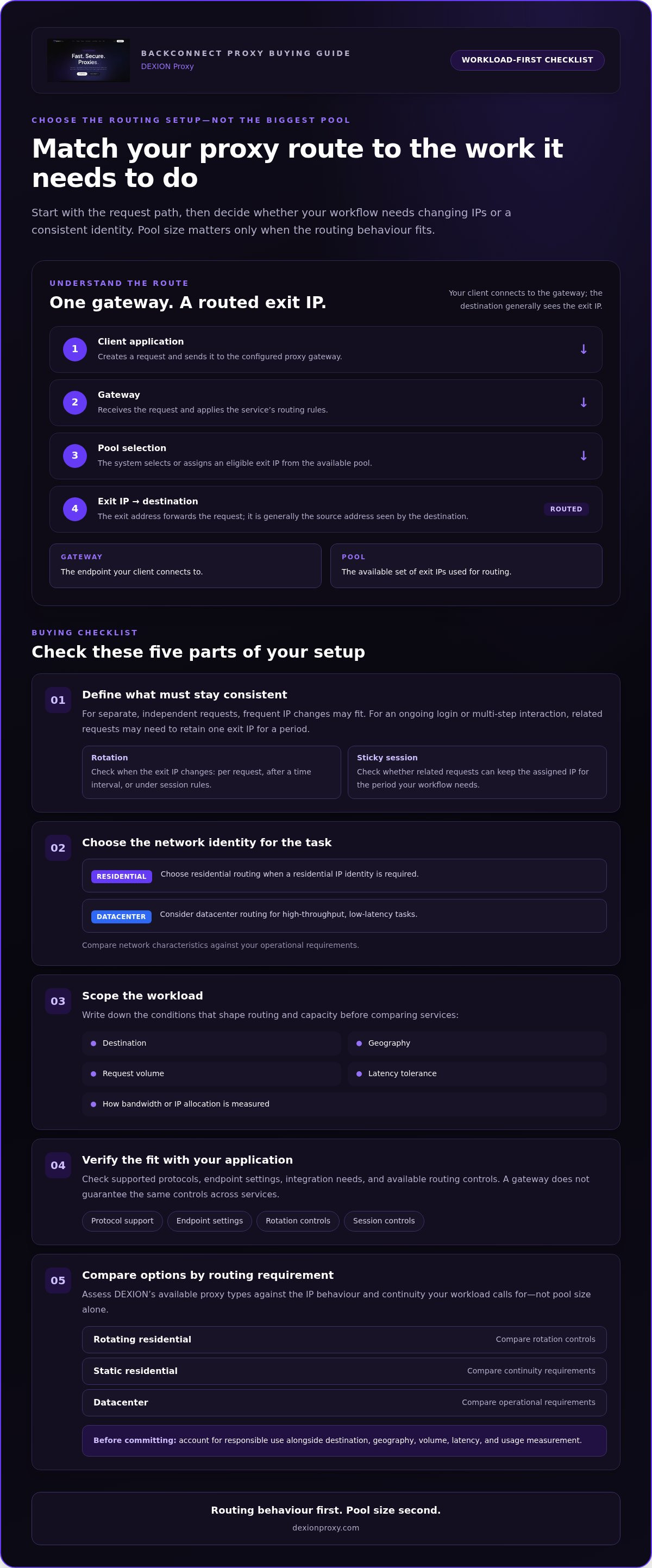
A backconnect proxy gives your client one gateway endpoint to use while the proxy service routes requests through an available pool of exit IPs. The gateway is the connection point, not necessarily the address a destination sees. If you buy backconnect proxies, you’re buying access to this routing arrangement, with the available IPs and routing behaviour determined by the service setup.
A gateway is an access point that forwards requests through a proxy pool; a single fixed proxy IP is one specific exit address, not a gateway to a pool. Connecting to one endpoint doesn’t, by itself, tell you which exit IP will handle a request or whether that address will stay the same.
How a gateway endpoint differs from a single proxy address
Your client sends a request to the gateway endpoint. The proxy system then selects or assigns an exit IP to forward the request to its destination. The destination generally sees the exit IP as the request’s source, while your software connects to the gateway. These addresses serve different roles. Supported protocols and routing controls can vary by service, so check that the endpoint settings fit your application.
What buyers mean by rotation, pool, and session
A pool is the set of exit IPs available for routing. Its value depends on whether its addresses and routing options fit the task, not simply on a headline size. Rotation means changing the exit IP according to configured or provider-defined behaviour. A session is a period in which related requests may keep the same exit IP. Session continuity and rotation can be managed differently, so neither behaviour is automatic in every setup.
For example, a workflow that sends separate, independent requests may work with frequent IP changes. One that relies on an ongoing login or multi-step interaction may need related requests to retain one IP for a period. In the first case, focus on the rotation policy. In the second, focus on session persistence. The gateway alone doesn’t determine which approach applies.
Before committing, identify what your application needs to control: the gateway connection, exit-IP selection, or how long an IP remains assigned. Then map those needs to the available session and rotation controls. A service may rotate per request, after a set time, or according to session behaviour. Treat these as possible policies, not universal defaults.
- Gateway: The endpoint your client connects to.
- Pool: The available set of exit IPs used for routing.
- Rotation: The policy that determines when the exit IP changes.
- Session: A period during which related requests may retain an IP.
Backconnect architecture describes how requests reach a pool. It doesn’t specify the pool’s IP type, guarantee rotation, or define identical controls across services. The Proxy server overview provides broader context on proxy types and functions. For a buying decision, first define the routing behaviour your workload requires, then assess the pool and session controls available with the setup.
How Backconnect Proxy Routing Handles Rotation and Sticky Sessions
A backconnect gateway can route requests through a pool while the client continues using one configured endpoint. The client doesn’t need to select an individual pool address for every request; routing rules handle that step behind the gateway. The exact behaviour depends on the service configuration.
A request’s path through the backconnect gateway
The routing sequence is straightforward:
- Client: Your application creates a request and sends it to the configured proxy gateway.
- Gateway: The gateway receives the request and applies its routing rules.
- Pool selection: The system selects or assigns an eligible exit IP from the available pool.
- Exit IP: That address forwards the request toward its destination.
- Destination: The destination receives the request from the exit IP, not from the gateway label your client connected to.
A gateway can route requests through a proxy pool without requiring the client to manage the pool’s individual exit IPs. That separation reduces routing work in the client application, but it doesn’t make every gateway’s controls or protocol support identical. Fortinet’s overview of how a proxy server works provides useful context on the intermediary role a proxy plays between a client and a destination.
Choosing between rotating and sticky session behaviour
Rotation policy determines when the selected exit IP changes. A service may change it for each request, after a time interval, or according to session rules. These patterns aren’t interchangeable. Request-based rotation can suit independent tasks that don’t rely on a persistent network identity. Time-based rotation changes the address after a defined period. Session-based behaviour ties address changes to a session’s rules.
Sticky sessions prioritise continuity. Related requests can retain the same exit IP for a period, which may help a workflow that depends on a consistent identity across multiple steps. Sticky behaviour doesn’t necessarily mean one uninterrupted connection; it means the routing policy aims to preserve the assigned IP across related requests.
Frequent rotation and stickiness solve different problems. If each request is independent, an IP change may be acceptable or useful. If the task involves a multi-step interaction, changing the exit IP midway can disrupt continuity. Before you buy backconnect proxies, map the workflow’s identity requirements to the rotation trigger, then assess the session behaviour and any duration limits. These controls depend on the service configuration.
DEXION’s rotating residential proxies combine automatic rotation with sticky-session capabilities, offering options for changing or retaining an exit identity. Compare DEXION proxy access with the routing behaviour your workload needs, rather than treating rotation as a universal default.
Residential or Datacenter Backconnect Proxies: Compare the Trade-Offs
Choose the IP category based on the identity and performance your workload requires. Residential routing uses residential IP addresses, while datacenter routing uses addresses associated with datacenter infrastructure. Neither category is universally better. The right fit depends on the destination, location requirements, latency tolerance, and whether your workflow needs rotation or a stable identity. Browserless explains how backconnect proxies work across different proxy categories.
| Routing type | Useful when | Operational trade-off |
|---|---|---|
| Rotating residential | A task requires residential IP characteristics, potentially with rotation or location targeting. | Automatic changes can suit independent requests; sticky sessions support workflows that need continuity. Performance can differ from datacenter routing. |
| Datacenter | Throughput and low latency are priorities. | Datacenter infrastructure can offer speed and efficiency, but its IP identity differs from a residential connection. |
| Static residential | A task requires a consistent residential IP identity. | A fixed address prioritises continuity rather than frequent IP changes. |
When residential backconnect routing fits the workload
Residential routing fits when the task specifically needs a residential IP identity, such as testing a location-dependent experience from a residential connection. Consider both the required geography and how requests relate to one another. Automatic rotation can suit separate operations, while sticky sessions can retain an IP across related steps. These controls shape routing behaviour, but they don’t guarantee acceptance or a particular outcome at the destination.
When datacenter or static residential access is a better fit
For operations that put throughput and latency first, DEXION’s datacenter proxies are designed for high-throughput, low-latency requirements. They’re a relevant option when residential identity isn’t essential. If the workflow instead needs a consistent residential identity, DEXION’s static residential proxies provide fixed-IP connections. The distinction is practical: choose based on performance priorities or identity continuity, not just the pool label.
Before you buy backconnect proxies, describe the workload in operational terms. Does it require residential IP characteristics, or is efficient datacenter routing sufficient? Must related requests retain a fixed identity, or can the IP change between independent tasks? Is a particular geography part of the requirement? Those answers narrow the category before pool size becomes a factor.
Rotation and proxy type are related choices, but they aren’t the same choice. A residential setup can support different session patterns, while static residential access prioritises a fixed IP. Datacenter access addresses a different performance profile. Align the IP identity and session behaviour with the task, then assess the setup against your latency and throughput needs.
A Practical Checklist for Buying Backconnect Proxies
A sound purchase starts with the workload, not a pool-size claim. Before you buy backconnect proxies, define the destination, required geography, request volume, session continuity, and acceptable latency. These inputs help determine whether residential, datacenter, or fixed residential IP access is appropriate and what to measure before deployment.
Questions to resolve before selecting a plan
Write down the requirements in operational terms, separating must-haves from preferences. A clear baseline makes it easier to compare routing options and avoid paying for capabilities the task doesn’t use.
- IP identity: Decide whether the workflow requires residential characteristics, datacenter performance, or a fixed residential identity.
- Geography: Specify the required location and whether country-level targeting is enough or the task needs greater precision.
- Workload: Estimate request volume and expected bandwidth from representative tasks. Choose a package basis, such as bandwidth usage or IP allocation, that matches how the workflow consumes access.
- Session behaviour: Establish whether requests can use changing exit IPs or need continuity across related steps. Note acceptable rotation triggers and sticky-session behaviour.
- Integration: Validate the authentication method, supported protocol, and gateway configuration against your client or application before rollout.
- Operations: Define usage limits, monitoring, and destination terms. Use proxies for authorized, legitimate workflows, not to bypass access controls or ignore a destination’s rules.
How to test routing behaviour in a controlled workflow
Run a limited test against targets you’re authorized to access. Keep it representative of the real workflow, but small enough to isolate routing issues before broader deployment.
- Record the baseline. Note the configured gateway, request pattern, expected location, and task-specific criteria for latency, stability, and bandwidth.
- Observe routing. Log the exit IP for each request and check when it changes. Compare the observed pattern with the intended rotation trigger or session behaviour.
- Measure performance. Track connection stability, response times, and bandwidth consumption across the test. Assess results against your task requirements, not a generic benchmark.
- Adjust and repeat. Document failures, then revise session persistence or rotation settings where available. Retest the same workflow to see whether the change addresses the issue.
This validation turns assumptions into operational evidence. It also helps distinguish an integration problem from a mismatch between the workload and its routing configuration.
Compare DEXION proxy categories against your geography, usage, and session requirements to identify a setup aligned with the workflow.
Choose a DEXION Proxy Setup That Matches Your Routing Requirements
The right setup follows from three decisions: what IP identity the task needs, whether requests must retain that identity, and what performance the workflow prioritises. If you buy backconnect proxies based only on pool size, you can overlook the controls that shape day-to-day routing. DEXION offers rotating residential, static residential, and datacenter proxies for different operational requirements.
Match DEXION proxy categories to operational priorities
Choose rotating residential proxies when dynamic residential IP access fits the task. DEXION supports automatic rotation and sticky sessions, so the routing approach can suit workflows that change IPs or need related requests to retain one. Choose static residential proxies when a fixed residential IP identity and consistent connections are central. Choose datacenter proxies when high throughput and low latency are the primary requirements, rather than a residential identity.
These categories address different priorities. A workflow with separate requests and a need for changing residential IPs points toward rotating residential access. A process that depends on a consistent residential identity points toward static residential access. A performance-focused operation where residential identity isn’t required may align better with datacenter proxies. Start with the task requirement, then select the category.
Move from requirements to a deployment decision
Turn the requirements into a short configuration brief before provisioning. Record the proxy category, required geography, session behaviour, expected usage, and the criteria you’ll use to evaluate results. DEXION packages can be selected based on bandwidth usage or IP allocation. Choose the basis that best reflects how the workflow consumes proxy access, rather than relying on an untested estimate.
Keep the initial configuration narrow. Set only the targeting and session controls needed for the workflow, then assess performance against documented criteria such as connection consistency, latency tolerance, and usage. If the results miss the task’s requirements, change one relevant setting at a time. That makes the impact easier to evaluate and avoids unnecessary complexity.
- Dynamic residential identity: Use rotating residential access when rotation fits the task, with sticky-session capability for continuity where needed.
- Fixed residential identity: Use static residential access when the workflow depends on a consistent IP.
- Throughput and latency: Use datacenter access when those performance priorities lead the decision.
Once the category, geography, session model, and usage basis are defined, review the Explore DEXION proxy options and select a subscription aligned with those requirements. Make the routing decision deliberately, keep the configuration fit for purpose, and validate it against the workload.
Put Your Routing Requirements Into Practice
Turn your workload requirements into a configuration you can evaluate. Define what must stay consistent, what can rotate, and how you’ll measure whether the setup supports the task. This gives your team a practical baseline for assessing usage and session behaviour as operational needs change.
DEXION’s rotating residential proxies combine automatic rotation with sticky-session capabilities. Static residential proxies support fixed-IP continuity, while datacenter proxies address throughput and latency priorities. Choose the category that aligns with the work, then use your operating criteria to guide deployment.
If you’re ready to buy backconnect proxies, start by defining the routing requirements rather than relying on a headline pool figure. Explore DEXION proxy options and choose a proxy setup that fits your operational plan.
Frequently Asked Questions
What is a backconnect proxy?
A backconnect proxy is a proxy service accessed through a gateway that routes traffic using a pool of exit IPs. Treat the gateway as the connection your application is configured to use, not as a promise about which IP will handle each request. Routing and session controls determine that behaviour. Keep those settings separate in your technical requirements so the endpoint and exit identity aren’t confused.
How do backconnect proxies rotate IP addresses?
The routing policy assigns an exit IP and changes it according to configured or provider-defined rotation behaviour. For example, a test can record the observed exit IP across a sequence of requests and compare changes with the intended policy. Don’t infer rotation timing from the gateway address alone. The actual trigger may depend on request handling or session rules.
Are backconnect proxies the same as rotating proxies?
No. “Backconnect” describes an access architecture, while “rotating” describes a behaviour. A backconnect gateway may route requests through a pool, but the IP doesn’t have to change on every request. Rotation can also be handled client-side when software switches between individual proxy addresses. For example, a system could use a gateway with persistent routing or manage address changes itself from a proxy list.
When should I use sticky sessions with backconnect proxies?
Use a sticky session when a sequence of related actions works best with the same exit IP. A workflow that signs in, loads account data, then saves a setting may be more coherent if its requests share an IP during that process. For independent checks, persistence may be unnecessary. Test the actual sequence and verify that the chosen session behaviour supports its continuity needs.
Are residential or datacenter backconnect proxies better?
Neither is universally better. Residential proxies fit tasks where residential IP identity is a requirement; datacenter proxies fit workloads that prioritise throughput and low latency. Identify which constraint would invalidate the task: missing residential characteristics or insufficient performance. Then evaluate the relevant category against your authorized workload, without assuming either type guarantees a destination’s acceptance.
What should I check before buying backconnect proxies?
Before you buy backconnect proxies, verify that the proxy category, geography, authentication method, protocol, and session controls fit your application. Check how usage is measured, whether by bandwidth or IP allocation, and estimate demand from representative workload data. Run a limited test against authorized targets. Record connection stability, observed IP changes, latency, and consumption, then compare the results with defined operating criteria.
Can backconnect proxies support both residential and datacenter traffic?
Backconnect describes how access is routed, not the origin of every IP in a pool. Residential and datacenter proxies are distinct categories, so don’t assume one gateway or pool combines both. DEXION provides rotating residential, static residential, and datacenter proxy options. Select the category that matches the task’s IP identity and performance requirements, and treat each option as its own routing choice.