 DEXION
Residential IP: What It Is and How ISP Assignment Works
What if “residential” describes an IP’s network classification, not the route your connection takes? That distinction is easy to miss. An IP address identifies a network endpoint, an ISP assigns or manages address space, and a proxy changes how traffic is routed. A residential ip is associated with…

What if “residential” describes an IP’s network classification, not the route your connection takes? That distinction is easy to miss. An IP address identifies a network endpoint, an ISP assigns or manages address space, and a proxy changes how traffic is routed. A residential ip is associated with an ISP’s residential network, but that label alone doesn’t tell you whether an address is fixed, rotating, or accessed through a proxy.
If you’ve found those terms used interchangeably, the confusion is understandable. An IP lookup can show network and location information, but it doesn’t explain every detail of a session or prove that traffic comes directly from a household connection. Classification and routing are separate layers.
This article explains how ISPs assign residential addresses, what network records can and can’t tell you, and how direct connections differ from residential proxy sessions. You’ll also see how static addresses, rotating IPs, and sticky sessions differ in practice. DEXION Proxy’s rotating and static residential options support different operational needs, and understanding the distinction helps you choose the right category for your workflow.
Key Takeaways
- A residential ip reflects how an address is attributed in network records, not proof of a person’s identity or exact location.
- Use ISP and ASN details to assess an IP lookup, then compare databases and account for differences in their data.
- Separate address stability from session behavior: a fixed IP stays consistent, while a sticky session persists temporarily.
- Understand how automatic rotation and sticky sessions shape the behavior of rotating residential proxy pools.
- Match the proxy category to the workflow: rotating residential supports changing IPs, while static residential provides a fixed address.
Table of Contents
What Is a Residential IP Address?
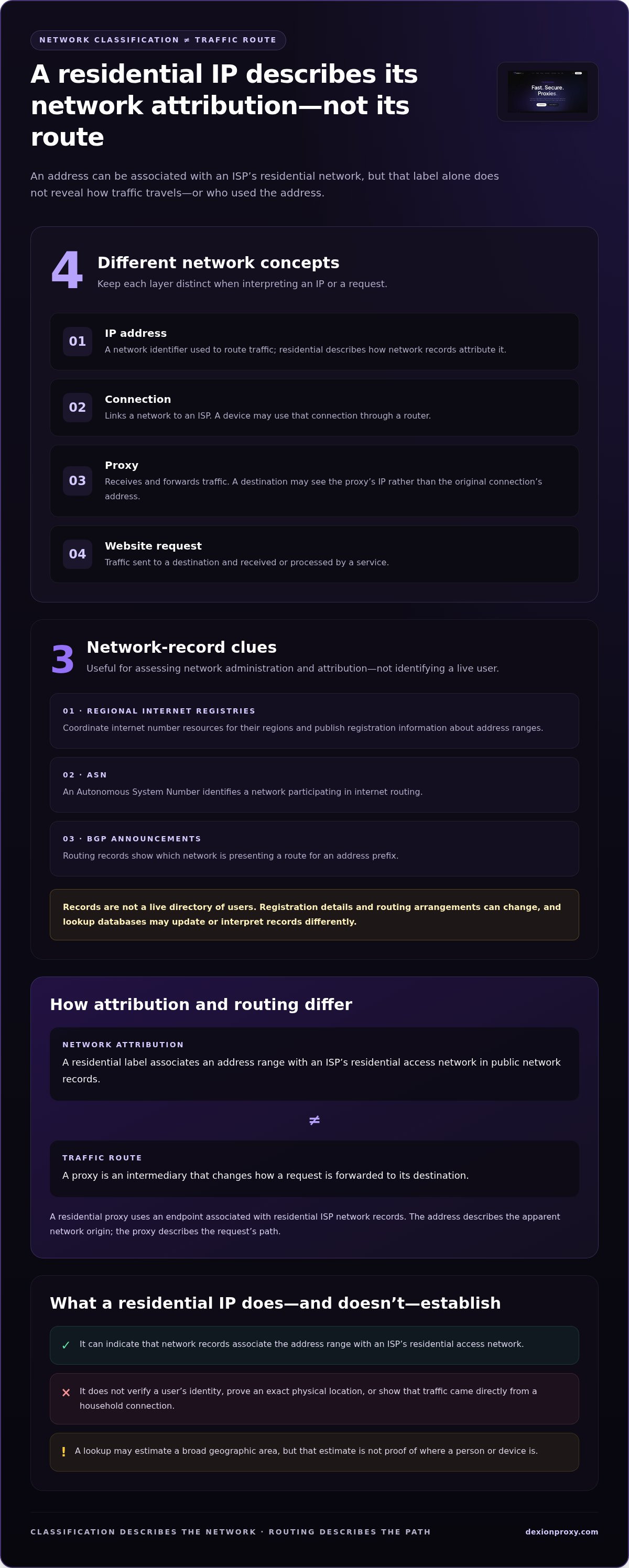
A residential IP is an IP address associated with an ISP that provides residential internet access. The label describes how a network attributes the address. It doesn’t verify who used it, identify a specific person, or prove that a connection came from a particular home.
An IP address is a network identifier used to route traffic, not the internet connection itself. A connection links a network to an ISP; a device may use that connection through a router; and a website request is traffic sent to a destination. A proxy server is another component: it receives traffic and forwards it, so the destination may see the proxy’s IP address rather than the original connection’s address. For background on the underlying concept, see this overview of an IP address.
What does the word residential describe?
An Internet Service Provider supplies internet connectivity and manages network address ranges used to deliver that service. Public registration and routing records can associate an address range with an organization or network type. If those records attribute the range to a provider’s residential access network, tools may classify its addresses as residential.
Featured snippet definition: A residential IP address is an internet address associated through network records with an ISP that provides residential access.
This is a network classification, not a household directory. The address alone doesn’t establish a subscriber’s identity or precise physical location. A lookup may estimate a broad geographic area, but that estimate isn’t proof of where a person or device is.
Residential IP versus residential proxy
The distinction is straightforward: an IP is an address; a proxy is a routing intermediary. A residential proxy service routes a request through an endpoint associated with residential ISP network records. The IP describes the apparent network origin; the proxy describes how traffic travels to its destination. The terms are related, but they aren’t interchangeable.
For example, a website receiving a request routed through a proxy may record the proxy’s exit IP. That address could have residential network attribution, but this doesn’t prove that a particular household or individual sent the request. The request’s path and the address classification answer different questions.
- Address: Identifies a network endpoint used in routing.
- Connection: Links a user’s network to an ISP.
- Proxy: Intermediates and forwards a request.
- Website request: The traffic a service receives and processes.
Residential classification alone doesn’t guarantee that a website will trust or allow a request, make the user anonymous, or establish a fixed location. Websites make access decisions using their own controls, while address and location records provide only a view of network attribution. Keep the layers separate: classification describes the network, and proxy routing describes the request’s path.
How ISP Assignment Shapes a Residential IP
A residential label begins with network administration, not with the device or person using an address. ISPs obtain or manage address ranges, announce routes for those ranges, and use their networks to connect customers. A provider may assign an address from its available pool to a customer-facing connection. The details vary by network, but the key point is consistent: an address range can be associated with an ISP without mapping one-to-one to individual households.
From ISP address range to network connection
Think of an address block as a range of network addresses managed as a unit. An ISP can use parts of that range across different services, locations, or access networks. It routes customer traffic through its infrastructure toward the wider internet. A block’s public attribution can help classify the network, but it doesn’t show exactly which connection used a particular address at a particular moment.
Illustrative example: An ISP manages a public address range and uses part of it for residential broadband. A customer’s router receives an address for its internet connection. A website sees the public address associated with the traffic and may identify the ISP from network records. That association points to the provider’s network, not a named subscriber.
Address assignment can also be temporary or persistent, depending on the ISP’s setup. A customer-facing connection may receive a different address later, while the ISP continues to manage the broader range. This is why a range’s classification and the behavior of an individual address over time are related but separate questions.
What network records can, and cannot, tell you
Regional Internet Registries coordinate internet number resources for their regions and publish registration information about address ranges. An Autonomous System Number, or ASN, identifies a network participating in internet routing. Routing records, including BGP announcements, show which network is presenting a route for an address prefix. Together, these records offer useful clues about network administration and attribution.
They aren’t a live directory of users. Registration details may reflect an organization that manages resources on behalf of another network, and routing arrangements can change. Different lookup databases may update at different times or interpret available records differently. As a result, an address can receive inconsistent labels across tools, or its displayed organization can differ from the ISP a customer recognizes.
Network ownership identifies who administers or routes an address range; it does not identify the end user behind a connection. Treat classification as evidence about network attribution, not proof of a household, person, or exact location. That distinction matters when you assess an address or plan a workflow around it.
If your operational requirement depends on routing through residential networks, compare the residential proxy options with the assignment details you need to manage.
Residential IP, Static IP, and Proxy Session: What Each Term Means
These terms describe different layers of a network setup. Residential classifies an address by its network attribution. Static describes whether an address stays consistent. Rotation and sticky sessions describe proxy behavior. Treating them as synonyms makes it harder to specify what a workflow actually needs.
| Term | What it describes | Practical meaning |
|---|---|---|
| Residential | Network classification | The address is attributed to an ISP serving residential access. |
| Static | Address continuity | The same IP address remains assigned for ongoing use. |
| Rotation | Proxy behavior | The IP used for requests changes according to the proxy’s rotation settings. |
| Sticky session | Temporary session behavior | Requests retain the same IP for a configured session period. |
Residential classification is not the same as a static address
Residential describes how network records classify an IP. Static describes continuity: the address remains consistent rather than changing as the connection or service operates. These properties can coexist, but one doesn’t imply the other. A residential IP can change over time, and the word “residential” alone doesn’t promise permanent assignment.
For example, an ISP may assign an address associated with its residential network and later change the address used by a customer connection. The network classification can remain residential even as the specific IP changes. Keep the questions separate: What kind of network is this address attributed to? and How consistently will this address be used?
Rotation and sticky sessions operate at the proxy layer
Rotation determines when a proxy uses a different IP for requests. Depending on the service configuration, changes may occur between requests or according to session behavior. A sticky session instead keeps requests associated with the same IP for a configured period. It provides temporary persistence, not an address assigned indefinitely.
Session rules vary by implementation, so “sticky” shouldn’t be read as a universal duration or permanent assignment. A workflow that needs repeated requests to appear from the same proxy IP may benefit from session persistence. A workflow that needs requests to use changing addresses may call for rotation. Neither setting changes the underlying meaning of residential network attribution.
DEXION Proxy’s rotating residential proxies combine automatic rotation with sticky session capabilities. Its static residential proxies provide fixed residential IP addresses. The distinction is operational: choose rotating behavior when changing IPs or session-level persistence fits the task; choose a static residential option when a consistent address is the requirement. These are routing and continuity choices, not guarantees of trust, access, or anonymity.
How to Interpret a Residential IP Lookup Result
An IP lookup is a starting point, not a verdict. It uses databases to estimate which organization or network is associated with an address and where that network may operate. The result can help you assess a residential ip classification, but it can’t prove who made a request, where a person lives, or why they connected.
A practical three-step classification check
Use a consistent process. Record what each source reports rather than treating one label as definitive. Focus first on network attribution, then account for differences in the tools’ data and methods.
- Check the reported organization and ASN. Enter the address in a reputable lookup tool. Note the listed ISP or organization, ASN, network type, and location estimate. An ASN can help identify the network announcing the address, but it doesn’t identify an individual user.
- Compare an independent database. Look up the same address in a second source. Record differences in the organization name, network category, or location instead of choosing the answer that appears most precise.
- Interpret the results in context. Consider whether traffic may be routed through a proxy or VPN, originate from a mobile network, or use an address block that has been reassigned. These factors can affect the label shown by a lookup tool.
IP geolocation is an estimate based on network data, not identity verification or proof of a physical address. Treat a city or region result as an approximate signal. Don’t use it to identify a specific person or household.
Why lookup results can disagree
Lookup providers maintain their own datasets and classification methods. They may receive updates at different times, so one service can show a previous network organization while another reflects a newer record. Address blocks can also be reassigned, and a database may not immediately reflect the change. Differences are a reason to compare evidence, not assume one tool is accurate in every field.
Routing can complicate interpretation, too. A proxy or VPN may make the visible address belong to an intermediary network rather than the user’s connection. Mobile networks can use centralized gateways, and network address translation (NAT) can let multiple devices share one public-facing IP. In both cases, an address lookup describes the visible network endpoint, not each device behind it.
- Network category: Use ISP, ASN, and registration details as clues about the address range.
- Location: Treat the result as an estimate, not a precise physical position.
- Identity or intent: Don’t infer either from the IP address alone.
Need residential routing for a defined workflow? Explore DEXION Proxy’s residential proxy options and distinguish rotating sessions from fixed residential IPs before selecting an approach.
How DEXION Proxy Uses Residential IPs
Once network classification is clear, the practical decision is about routing behavior. DEXION Proxy offers two residential proxy categories: rotating residential proxies, which use dynamic IP pools, and static residential proxies, which provide fixed residential IP addresses. The right fit depends on whether a workflow needs changing addresses or continuity from one address.
When rotating residential proxies fit a workflow
Rotation suits legitimate operations that need requests to use different IPs over time. For example, a team conducting market research across regions may need to observe how public-facing content or prices appear from different geographic vantage points. Geographic targeting can help align the route with the region relevant to that task.
DEXION Proxy’s rotating residential proxies include automatic rotation, reducing the need to manage each IP change manually. When a task needs continuity for a sequence of requests, sticky session capabilities let the session retain an IP temporarily. Rotation and stickiness serve different purposes: one changes the address used, while the other maintains session-level continuity.
Set the behavior around the workflow. Use changing IPs when the task calls for varied network vantage points. Use a sticky session when related requests need to remain associated with the same IP during a session. Rotation doesn’t guarantee access to a website or override its policies, and geographic targeting doesn’t prove an exact physical location.
When fixed residential access fits a workflow
A fixed residential IP is useful when an operation depends on a consistent address across repeated connections. A business managing a permitted account workflow, for example, may prefer not to change the network endpoint between sessions. Here, the requirement is address continuity. It isn’t a promise of account approval, increased trust, or uninterrupted access.
Static residential proxies provide that fixed-address option. They differ from sticky sessions: a sticky session preserves an IP for a configured session period, while a static residential proxy provides a fixed residential IP address. Select based on the duration and scope of continuity your process requires.
Before choosing, define the operational requirement in plain terms: Do requests need to change addresses, retain one address temporarily, or use a fixed residential address? That answer determines the relevant category. Avoid selecting based only on the residential label; classification describes the network, while the service configuration determines how the proxy handles addresses and sessions.
For workflows that require changing IPs or a fixed residential address, explore DEXION Proxy’s residential proxy options.
Turn Network Requirements Into a Clear Proxy Setup
Make the next step operational. Before choosing a route, define what the workflow needs to preserve: changing network endpoints, continuity within a session, or a consistent address across repeated activity. That requirement matters more than the label alone. A residential ip classification describes network attribution; it doesn’t determine the right session behavior for your process.
For tasks that call for changing addresses with the option to maintain session continuity, DEXION Proxy’s rotating residential proxies combine automatic rotation with sticky session capabilities. For workflows that depend on the same address remaining consistent, static residential proxies provide fixed residential IP addresses. Choose based on the workflow’s actual requirements, not assumptions about access or outcomes.
Clear requirements make configuration more deliberate. Define the expected address behavior, apply it to a legitimate operational task, and keep the setup aligned with that purpose. Explore DEXION Proxy residential options to identify the category that fits your workflow. A precise starting point gives your team a clearer path to execution.
Frequently Asked Questions
Is a residential IP the same as a home IP address?
Not exactly. “Home IP” is an informal phrase that usually refers to an address used for residential internet access. “Residential” in a lookup describes how the address is attributed to a network, not a verified home or subscriber. An apartment building’s shared connection, for example, may serve multiple households through one public address. The label alone doesn’t identify which household or device generated a particular request.
Can a residential IP reveal someone’s exact location?
No. An IP lookup may estimate a country, region, or city, but that estimate isn’t a precise location record. The result can reflect the ISP’s network infrastructure rather than where a device is physically located. For example, a person’s connection may appear near an ISP gateway serving a wider area. Don’t use an IP result alone to pinpoint an address or make claims about someone’s whereabouts.
Does a residential IP always belong to one person?
No. One public IP can represent traffic from multiple devices, and sometimes multiple users. A household router typically connects several devices through one public-facing address; carrier networks can also share addresses among customers. So an IP isn’t a personal identifier. If you’re reviewing a log, pair the address with relevant timestamps and service-side records, and avoid treating the IP alone as proof of who acted.
Can a residential IP address change?
Yes. An ISP may assign a different address to a residential connection over time, so an address seen in an earlier log may not represent the same connection later. The change can affect comparisons between sessions or records. If you’re investigating a network event, preserve the timestamp alongside the IP address. Without that context, a historical lookup may be mistaken for a current description of the connection.
Is a residential IP the same as a static residential IP?
No. Residential describes the address’s network classification; static describes its continuity. A residential address can change, while a static residential proxy provides a fixed residential IP address. For a workflow that needs one consistent endpoint across repeated connections, continuity is the requirement to specify. Don’t assume an address will remain fixed simply because a lookup classifies it as residential.
Can an IP lookup reliably tell whether an address is residential?
An IP lookup can provide useful clues, but its label isn’t definitive proof. Tools classify addresses using their own records, which can be outdated or differ in how they categorize networks. A mobile gateway or proxy route can also affect the visible organization. For an operational review, compare the reported network organization across independent sources and treat disagreement as uncertainty, not evidence that one result must be correct.
Does using a residential proxy make a connection anonymous?
No. A residential proxy changes the route a request takes and can make the proxy’s IP visible to the destination, but it doesn’t erase other identifying signals. A logged-in account, browser data, or request details may still associate activity with a user or session. Treat a proxy as a routing component, not an anonymity guarantee. Use it only for legitimate tasks and follow the destination service’s rules.