 DEXION
Residential Proxies: A Practical Guide to IPs, Sessions, and Use Cases
Residential proxies route traffic through an IP address associated with residential internet service. They are not automatically the right choice for every task: if a workflow needs a consistent identity, changing IPs can disrupt it; if it needs changing residential IPs, a fixed address may not fit.…

Residential proxies route traffic through an IP address associated with residential internet service. They are not automatically the right choice for every task: if a workflow needs a consistent identity, changing IPs can disrupt it; if it needs changing residential IPs, a fixed address may not fit. The right setup depends on the network context and session behavior the task requires.
Pool size, speed, and success rate are common comparison points, but their meaning depends on how they are measured and whether they match your workload. This guide explains how residential proxy traffic is routed, how rotating and sticky sessions behave, and when static residential or datacenter proxies may be a better fit.
You’ll learn how to assess a proxy setup by session stability, task requirements, latency sensitivity, and geographic needs. DEXION offers rotating residential, static residential, and datacenter proxies for different network requirements. Use the decision framework below to identify what your workflow needs, rather than treating proxy types as interchangeable or relying on marketing claims.
Key Takeaways
- Residential proxies route requests through a residential exit IP, changing the network address visible to the destination.
- Match rotation or sticky-session behavior to whether your workflow needs changing IPs or continuity across requests.
- Assess residential proxies against your workload’s IP context, session needs, latency sensitivity, and geographic requirements.
- Define the task, test the configuration, and monitor results while respecting applicable law, destination terms, and authorization.
- Choose DEXION rotating residential proxies for automatic rotation or sticky sessions, and static residential proxies when a fixed residential IP is required.
Table of Contents
- Residential Proxies: What the IP Source Changes in a Request
- How Residential Proxy Routing, Rotation, and Sessions Work
- How to Assess Residential Proxies Against Your Workload
- Deploy Residential Proxies with Clear Controls and Responsible Use
- Choose a DEXION Residential Proxy Option for the Required Session Model
Residential Proxies: What the IP Source Changes in a Request
Residential proxies route a request through an intermediary using an IP address associated with residential internet service. The destination sees the proxy’s exit IP as the request’s network source, rather than the user’s original network IP. This changes the connection’s visible origin, but it does not establish who is using the connection or why.
A residential proxy is an intermediary that forwards traffic through an IP address associated with residential internet service. The classification describes the network origin, not necessarily a specific household device. The Residential proxy overview offers a foundational explanation of the category. Treat the IP source as one part of the request context, not proof of anonymity, account trust, or guaranteed access.
How residential IPs differ from server-hosted IPs
The distinction is the network associated with the exit address. A residential IP is associated with an Internet Service Provider (ISP) serving residential customers. A datacenter IP comes from server-hosted infrastructure. These labels describe where an address originates in the network, not the purpose or legitimacy of a user’s activity. Neither origin guarantees that a destination will accept a request, and residential addresses are not inherently undetectable or universally trusted.
Choose by task, not assumption. If an authorized workflow needs to observe a service from a residential-network context, IP origin may matter. If the priority is high throughput or low latency, a residential address alone will not meet that need; datacenter infrastructure may be the more relevant category to assess.
Where residential proxies fit in a network stack
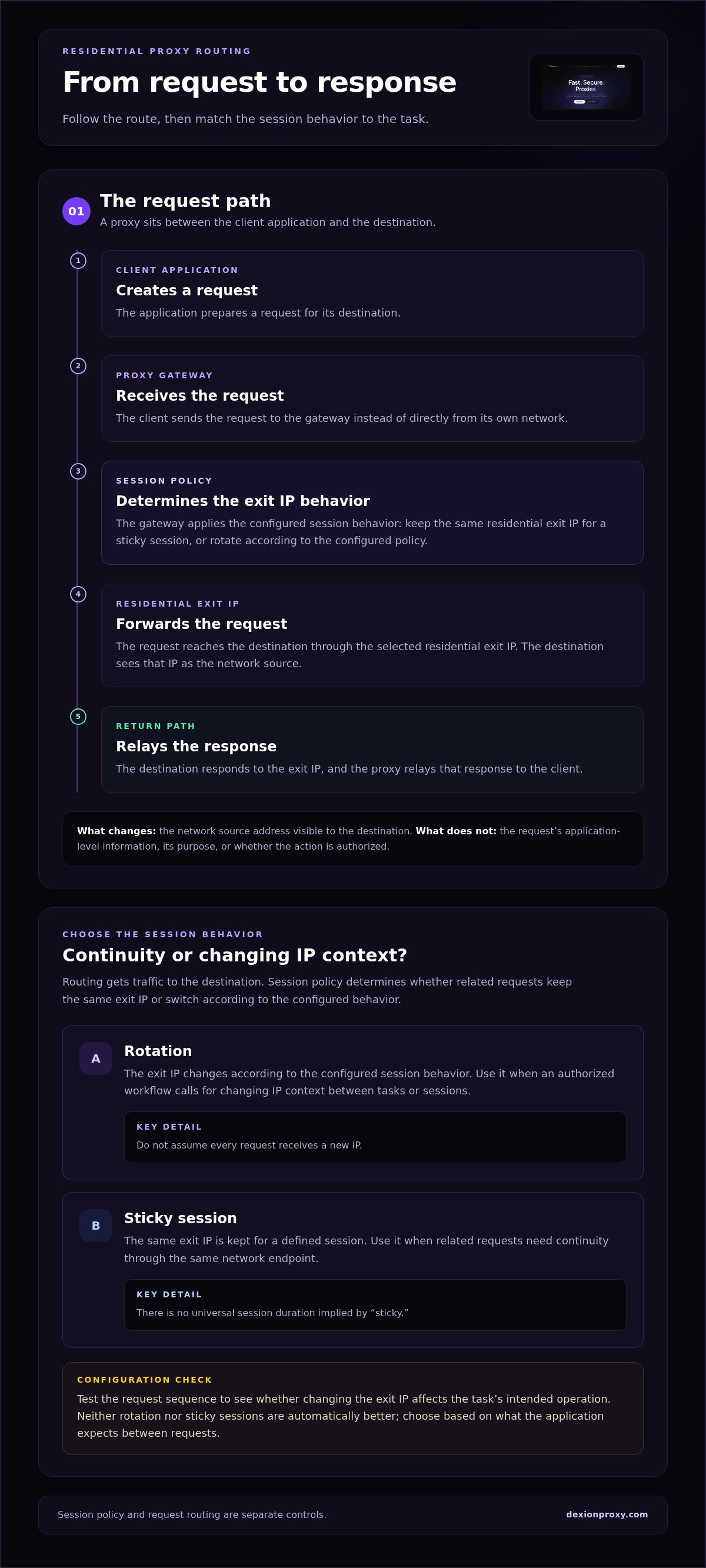
The proxy sits between the client application and the destination. Typically, the client connects to a proxy gateway, which forwards traffic through a residential exit IP. The destination receives the request from that endpoint and sees its IP address as the network source.
- The client application creates a request for a destination.
- The request travels to the proxy gateway instead of directly from the user’s network.
- The gateway forwards it through the selected residential exit IP.
- The destination responds to that exit IP, and the proxy relays the response to the client.
This routing changes the source address visible at the destination. It does not erase information in the request itself, such as account credentials or application-level identifiers, and it does not make an action authorized. Keep these distinctions in mind when assessing privacy, access, and operational suitability.
Start with a practical question: does the workload require a residential-network origin, or simply another route to the destination? Residential proxies fit when IP context is part of a legitimate task requirement. They are not a default upgrade for every request, and the IP category does not replace authorization, purpose, or sound network controls.
How Residential Proxy Routing, Rotation, and Sessions Work
Routing and session policy solve different problems. Routing determines how a request reaches its destination. Session policy determines whether related requests use the same residential exit IP or switch to another one. Treating these as separate controls makes it easier to configure a workflow that behaves consistently.
What happens during a residential proxy request
The client application sends a request to a proxy endpoint. The gateway receives it, applies the session behavior in effect, and forwards it through an assigned residential exit IP. The destination processes the request and sends a response through the proxy path, which relays it to the client.
- The client application creates a request for a destination.
- The client sends the request to the proxy gateway.
- The gateway forwards it through a residential exit IP selected for the session.
- The destination responds, and the gateway relays the response to the client.
The gateway controls the route and whether the exit IP remains consistent. It does not change the application’s purpose, grant account permissions, or override the destination’s rules. Your application still determines what it requests and how it handles the response.
Rotating IPs versus sticky sessions
Rotation changes the exit IP according to the configured session behavior. A workflow may need a different IP context across separate, authorized tasks. Rotation occurs according to the session policy, so do not assume that every request receives a new IP.
A sticky session keeps the same exit IP for a defined session, without implying a universal duration. This continuity can help when related requests need to come from the same network endpoint. For example, a multi-step process that relies on a consistent connection context may be disrupted if the exit IP changes between steps.
Neither setting is automatically better. Decide based on what the application expects between requests:
- Use rotation when the workflow calls for changing exit-IP context between tasks or sessions.
- Use a sticky session when related requests need continuity through the same exit IP.
- Test the sequence to find out whether changing the exit IP affects the task’s legitimate, intended operation.
A sticky proxy session does not necessarily preserve application state. Cookies, authentication, and other session data are handled by the application and destination. The proxy controls the network route, not those higher-level mechanisms. Consider these separate layers when troubleshooting interruptions.
DEXION’s rotating residential service supports automatic rotation and sticky-session capabilities. For a fixed residential address rather than session-based continuity, DEXION also offers static residential proxies. Reviewing DEXION residential proxy options can help you match the session behavior to the appropriate proxy category.
How to Assess Residential Proxies Against Your Workload
Start with the task, not the largest pool or fastest headline. Residential proxies make sense when a workflow requires a residential-network context. High request volume alone does not establish that need. If throughput and low latency matter more than residential IP origin, datacenter proxies may be the more relevant category to evaluate.
Use this matrix to turn requirements into a proxy decision:
| Requirement | What to assess | Operational fit |
|---|---|---|
| IP source | Does the task require a residential-network context? | Choose residential routing for that context; consider datacenter routing when it is not required. |
| Session continuity | Must related requests keep the same exit IP, or should it change? | Use sticky-session behavior for continuity, rotation for changing IP context. |
| Latency sensitivity | How much delay can the task tolerate? | Test against the workflow’s response-time threshold; assess datacenter proxies if throughput and low latency take priority. |
| Geographic needs | Does the task depend on a particular target geography? | Align the proxy’s available targeting with the locations the authorized workflow needs. |
Match proxy characteristics to operational requirements
Translate requirements into observable behavior. A workflow that separates requests by exit-IP context may suit rotation. A process that relies on continuity across related requests may need sticky sessions. For geographic requirements, define the location the task must represent rather than treating broad coverage as useful by default. The key distinction between rotating and static proxies is whether the IP should change or remain fixed for the workflow.
Test with the real request pattern. A small, controlled run can show whether session changes interrupt a permitted sequence, whether latency fits the application’s tolerance, and whether the required geography is available. Keep the test’s target and request behavior consistent with the intended use.
Read performance claims without relying on headline numbers
Pool size, success rate, and response time are provider-reported metrics, not guarantees for every workload. Their meaning depends on the definitions and test conditions. A reported success rate, for example, is difficult to compare unless you know what counted as a successful response, which targets were tested, and how failures were classified.
Compare like with like. Use the same destination set, request volume, session policy, geographic requirements, and time window for each test. Record response times alongside completion outcomes, then repeat the test under representative conditions. Separate advertised figures from results measured in your own environment.
- Define the metric: identify what counts as success and how response time is measured.
- Hold conditions steady: keep targets, request patterns, and test windows equivalent.
- Measure task outcomes: evaluate completed, authorized work rather than pool size alone.
The useful result is not a headline number. It is evidence that proxy type, session behavior, geography, and latency tolerance fit the workload together.
Deploy Residential Proxies with Clear Controls and Responsible Use
Reliable deployment starts with a defined, authorized task, not proxy access alone. Residential proxies change the network route. They do not grant permission to access a destination, override its terms, or guarantee that a request will succeed. Build the workflow around clear boundaries, limited access, and observable results.
A practical setup and validation sequence
Before sending traffic, define the target, permitted activity, required session behavior, and measurable success criteria. Configure the proxy endpoint in the approved client environment and set rotation or session continuity to match the task. Test with a small, controlled request set before expanding. Review the route, latency, errors, and resource use, then adjust only within the authorized scope.
- Define the purpose. Record which destination and activity the workflow covers, what authorization applies, and what outcome counts as success.
- Set the operating model. Specify the needed geography, request pattern, and session behavior. Keep the configuration limited to those requirements.
- Run a controlled test. Use a narrow test scope and check whether requests follow the intended route and session policy.
- Review before scaling. Examine response times, failures, and resource consumption. Investigate unexpected results before increasing request volume.
- Monitor in operation. Track relevant changes in error rates, latency, and usage. Pause the workflow if it moves outside approved limits.
Define stop conditions in advance. A spike in errors, an unexpected destination response, or activity outside the authorized scope should trigger a review, not an automatic increase in traffic.
Govern access, data, and operating limits
Access control is part of network integrity. Restrict proxy credentials to approved users and systems, store them securely, and remove access when it is no longer needed. Apply request limits suited to the authorized task, and retain only operational records necessary for oversight. Monitoring should help operators identify abnormal usage without collecting unrelated data.
Before deployment, review the requirements that apply to your organization and the destination, including applicable law, destination terms, and the scope of your authorization. Document the decision and keep the workflow within those boundaries. If the task or destination changes, reassess access and limits before sending new requests.
Keep the control model simple: approved purpose, narrow credentials, defined limits, and a clear response to exceptions. These measures make proxy activity easier to audit and help prevent a valid technical configuration from drifting into an unapproved use.
Build a controlled workflow around the session behavior it needs, then explore DEXION residential proxy options for rotating or static residential IP requirements.
Choose a DEXION Residential Proxy Option for the Required Session Model
Choose the proxy model based on how the workflow should handle its exit IP. Does the task need changing residential IP context, continuity across related requests, or one fixed residential address? These are distinct requirements. DEXION’s residential options support different session models, while datacenter proxies address a separate priority: workloads where high throughput and low latency matter more than residential IP context.
When DEXION rotating residential proxies fit
DEXION rotating residential proxies suit workflows that need automatic changes in residential exit-IP context. For separate, authorized tasks, rotation can meet a requirement to use different exit IPs. Not every workflow needs a change on every request, however. Set session behavior according to the task rather than assuming more rotation is always better.
When related requests need continuity, sticky sessions provide the option to keep an IP for a defined session. DEXION’s rotating residential service includes automatic rotation and sticky-session capabilities, supporting both changing-IP and session-continuity requirements. This is a session-model choice, not a promise of access, success, or a particular result at a destination.
When DEXION static residential proxies fit
Choose DEXION static residential proxies when the workflow depends on a fixed residential IP address. A fixed address provides a consistent network identity across the relevant activity, rather than changing the exit IP according to rotating-session behavior. This can suit processes configured around one stable endpoint. It does not guarantee that an account or destination will treat requests as trusted.
Make the decision explicit before deployment. If the workflow requires a changing residential exit IP or continuity within rotating sessions, assess the rotating residential option. If it depends on a fixed residential address, choose static residential proxies. Keep the intended session behavior and authorized task in view; neither model makes an otherwise unsuitable use appropriate.
Datacenter proxies are a separate infrastructure choice. If the primary requirement is high throughput and low latency, and residential IP context is not central to the task, compare that category against the workload’s actual requirements. Residential and datacenter options are not interchangeable labels; each serves a different network priority.
- Changing residential context: Consider rotating residential proxies with automatic rotation.
- Continuity within a session: Consider sticky sessions when related requests need the same exit IP.
- Fixed residential identity: Consider static residential proxies.
- Throughput and latency priority: Consider datacenter proxies when residential context is not required.
Set the session model first, then choose the proxy category that matches it. Choose your DEXION proxy option for the workflow’s required IP behavior.
Put Your Proxy Requirements Into Practice
Turn your workflow requirements into a decision you can validate. Define the network context, session continuity, and operating limits the task needs. Then test the configuration against your own authorized workload before expanding it. This keeps residential proxies aligned with an operational requirement rather than a headline claim.
DEXION’s rotating residential proxies support automatic rotation and sticky-session capabilities. Static residential proxies provide fixed residential IP addresses. Choose the model that matches how your workflow should handle its exit IP, then keep access and monitoring within the boundaries you set.
Make the next step practical: map your session model to the right proxy option and start with a controlled test. Explore DEXION residential proxy options and build a network setup around your requirements.
Frequently Asked Questions
What is a residential proxy, in simple terms?
A residential proxy is an intermediary that sends a request through an IP address associated with residential internet service. For example, a company testing how its public website appears from a residential network could route an authorized test through one. The destination sees the proxy’s exit IP, not the user’s network IP. That changes the request’s visible network context, but it does not establish the user’s identity or purpose.
Are residential proxies the same as a VPN?
No. A residential proxy routes selected traffic through a proxy endpoint using a residential IP. A VPN creates an encrypted tunnel between a device and a VPN service. They differ in architecture, traffic handling, and controls. For example, a developer might configure one application to use a proxy while other device traffic follows its usual route. Choose according to the network design and security controls the task requires.
Can residential proxies prevent websites from blocking requests?
No. A residential IP does not guarantee that a destination will accept requests. A site may consider request frequency, account activity, browser or application signals, and its own access rules. If a legitimate request fails, inspect the response and check that your workflow complies with the destination’s terms. Do not increase traffic or rotate IPs to evade a restriction. Use only authorized access and operate within applicable limits.
What happens to my IP address when a residential proxy rotates?
The exit IP used for a request changes according to the proxy’s configured rotation behavior. That does not mean every request automatically receives a new address: session rules determine when the change occurs. For instance, a batch process may use a consistent IP during related steps, then a different one for another session. Test the configured behavior with a permitted workflow and check whether IP changes disrupt application state.
Is it legal to use residential proxies?
It depends on the jurisdiction, purpose, and activity. A proxy does not bypass privacy or data-protection requirements, access restrictions, or contractual terms. Before deployment, document why access is permitted, review the destination’s rules, and limit requests to the approved scope. Cross-border activity or sensitive data can raise additional questions. For a specific legal or regulatory assessment, consult qualified legal counsel familiar with the relevant jurisdictions.
Can residential proxies be used with any application?
No. Compatibility depends on whether an application supports proxy configuration and whether its connection requirements match the proxy service’s supported protocols and authentication methods. A browser setting, for example, may not control traffic from a separate background process. Check the application’s networking controls, configure the intended client, and test a small, authorized request before integrating the proxy into a larger workflow.
When should I use a static residential proxy instead of a rotating one?
Use a static residential proxy when a legitimate workflow depends on a consistent residential IP across its activity, such as an approved service that associates access with one network address. Choose rotation when the task requires changing exit-IP context instead. First identify whether continuity or IP change is essential, then test that model with the actual application. Neither choice guarantees account stability or uninterrupted destination access.